

Danh mục sản phẩm

Tổng hợp cấu hình cơ bản Juniper SRX: PPPoE, NAT, DHCP và Public Server
1. Giới thiệu về Juniper SRX
Juniper SRX Series là dòng Security Gateway của Juniper Networks, cung cấp nhiều chức năng bảo mật và định tuyến trong cùng một thiết bị như firewall, NAT, VPN và routing.
Thiết bị SRX chạy trên Junos OS, một hệ điều hành mạng nổi tiếng với kiến trúc ổn định, cấu hình phân cấp (hierarchical configuration) và khả năng rollback cấu hình.
Trong hệ thống mạng doanh nghiệp, Juniper SRX thường được triển khai tại:
-
Firewall biên (Edge Firewall)
-
Gateway bảo mật cho chi nhánh
-
VPN gateway kết nối site-to-site
-
Firewall cho hệ thống trung tâm dữ liệu
Để triển khai một firewall SRX cơ bản, quản trị viên thường cần cấu hình:
-
Interface và địa chỉ IP
-
Routing
-
Security Zones
-
NAT
-
Security Policy
2. Sơ đồ Topology SRX + PPPoE + NAT + Public Server
Topology dưới đây mô tả một mô hình phổ biến:
-
Firewall SRX kết nối ISP qua PPPoE
-
LAN sử dụng mạng 192.168.1.0/24
-
Máy chủ nội bộ được publish ra Internet bằng Destination NAT
-
Firewall cung cấp DHCP cho LAN
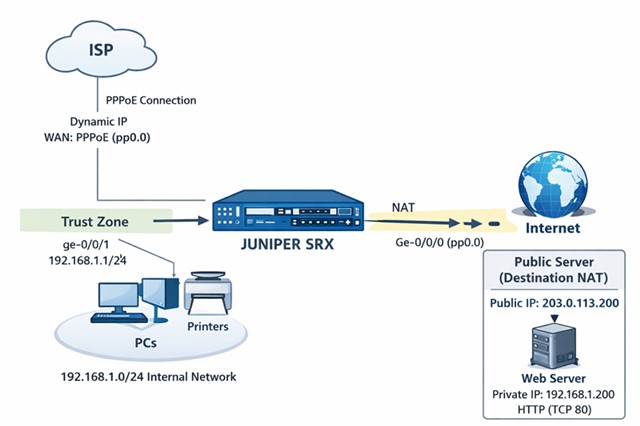
Mô hình gồm:
| Thành phần | Mô tả |
|---|---|
| ISP | Kết nối Internet |
| PPPoE | Kết nối WAN |
| SRX | Firewall + NAT + DHCP |
| LAN | 192.168.1.0/24 |
| Web Server | 192.168.1.200 |
4. Khái niệm Unit trong Interface Juniper
Trong Junos OS, địa chỉ IP không gắn trực tiếp vào physical interface, mà gắn vào logical interface gọi là unit.
Ví dụ:
set interfaces ge-0/0/1 unit 0 family inet address 192.168.1.1/24
Giải thích:
| Thành phần | Ý nghĩa |
|---|---|
| ge-0/0/1 | Interface vật lý |
| unit 0 | Interface logic |
| family inet | IPv4 |
| address | Địa chỉ IP |
Một interface có thể có nhiều unit.
Ví dụ:
ge-0/0/0
 ├── unit 0
 ├── unit 10
 └── unit 20
Điều này giúp Junos dễ dàng hỗ trợ:
-
VLAN sub-interface
-
PPPoE
-
VRF
-
nhiều dịch vụ trên cùng cổng
5. Cấu hình cơ bản Juniper SRX
5.1 Cấu hình hostname và mật khẩu root (encrypted)
Để tăng bảo mật, nên cấu hình password dạng encrypted.
set system host-name SRX-FW
set system root-authentication encrypted-password "$6$xxxxxxxxxxxxxxxx"
Sau đó áp dụng cấu hình:
commit
5.2 Cấu hình địa chỉ IP cho LAN
set interfaces ge-0/0/1 unit 0 family inet address 192.168.1.1/24
Kiểm tra interface:
show interfaces terse
5.3 Cấu hình Security Zone
set security zones security-zone trust interfaces ge-0/0/1
set security zones security-zone untrust interfaces ge-0/0/0
Cho phép quản trị:
set security zones security-zone trust host-inbound-traffic system-services ssh
set security zones security-zone trust host-inbound-traffic system-services ping
6. Cấu hình DHCP Server trên SRX
Firewall có thể cấp phát IP cho mạng LAN.
6.1 Tạo DHCP Pool
set access address-assignment pool LAN-DHCP family inet network 192.168.1.0/24
set access address-assignment pool LAN-DHCP family inet range DHCP-RANGE low 192.168.1.100
set access address-assignment pool LAN-DHCP family inet range DHCP-RANGE high 192.168.1.200
6.2 Gateway và DNS
set access address-assignment pool LAN-DHCP family inet dhcp-attributes router 192.168.1.1
set access address-assignment pool LAN-DHCP family inet dhcp-attributes name-server 8.8.8.8
6.3 Gán DHCP cho interface
set system services dhcp-local-server group LAN interface ge-0/0/1.0
7. Cấu hình PPPoE kết nối ISP
7.1 Tạo PPPoE interface
set interfaces ge-0/0/0 unit 0 encapsulation ppp-over-ether
set interfaces ge-0/0/0 unit 0 pppoe-options underlying-interface ge-0/0/0
set interfaces ge-0/0/0 unit 0 pppoe-options auto-reconnect 10
7.2 Cấu hình xác thực PPPoE
set interfaces ge-0/0/0 unit 0 ppp-options chap local-name USERNAME
set interfaces ge-0/0/0 unit 0 ppp-options chap default-chap-secret PASSWORD
7.3 Nhận IP từ ISP
set interfaces ge-0/0/0 unit 0 family inet negotiate-address
7.4 Default Route
set routing-options static route 0.0.0.0/0 next-hop pp0.0
8. Cấu hình Source NAT cho LAN ra Internet
set security nat source rule-set trust-to-untrust from zone trust
set security nat source rule-set trust-to-untrust to zone untrust
set security nat source rule-set trust-to-untrust rule NAT-ALL match source-address 0.0.0.0/0
set security nat source rule-set trust-to-untrust rule NAT-ALL then source-nat interface
9. Public Server ra Internet (Destination NAT)
Ví dụ:
Public IP
203.0.113.200
Server nội bộ
192.168.1.200
9.1 NAT Pool
set security nat destination pool web-server address 192.168.1.200/32
9.2 NAT Rule
set security nat destination rule-set web-nat from zone untrust
set security nat destination rule-set web-nat rule web rule-match destination-address 203.0.113.200/32
set security nat destination rule-set web-nat rule web then destination-nat pool web-server
9.3 Proxy ARP
set security nat proxy-arp interface ge-0/0/0 address 203.0.113.200/32
9.4 Security Policy
set security policies from-zone untrust to-zone trust policy allow-web match source-address any
set security policies from-zone untrust to-zone trust policy allow-web match destination-address any
set security policies from-zone untrust to-zone trust policy allow-web match application junos-http
set security policies from-zone untrust to-zone trust policy allow-web then permit
10. Các lệnh kiểm tra và giám sát
10.1 Kiểm tra interface
show interfaces terse
10.2 Kiểm tra routing
show route
10.3 Kiểm tra NAT
show security nat source
show security nat destination
10.4 Kiểm tra firewall session
show security flow session summary
11. Kết luận
Juniper SRX là một firewall mạnh mẽ cho hệ thống mạng doanh nghiệp. Khi triển khai SRX, quản trị viên cần nắm vững các cấu hình quan trọng như:
-
Interface và logical unit
-
Security zone
-
NAT
-
PPPoE
-
DHCP server
-
Security policy
Khi cấu hình đúng các thành phần trên, firewall SRX có thể cung cấp đầy đủ chức năng gateway Internet, NAT, DHCP và bảo mật hệ thống mạng.
Phần bổ xung: Sự khác biệt giữa Physical Interface và Logical Interface trong Junos
12. Khái niệm Physical Interface và Logical Interface trong Junos
Khi cấu hình thiết bị Juniper SRX Series, nhiều quản trị viên mới thường thắc mắc vì sao các lệnh cấu hình lại sử dụng dạng ge-0/0/1.0 thay vì chỉ ge-0/0/1. Điều này xuất phát từ kiến trúc interface của Junos OS, trong đó mỗi cổng mạng được chia thành physical interface và logical interface (unit).
12.1 Physical Interface
Physical interface là cổng mạng vật lý trên thiết bị.
Ví dụ:
ge-0/0/0
ge-0/0/1
ge-0/0/2
Các interface này chỉ đại diện cho phần cứng của cổng mạng, chưa chứa thông tin:
-
IP address
-
VLAN
-
routing
-
dịch vụ mạng
Do đó trong Junos, IP không được gán trực tiếp vào physical interface.
12.2 Logical Interface (Unit)
Logical interface là interface logic nằm trên physical interface, được định danh bằng unit number.
Ví dụ:
ge-0/0/1.0
Trong đó:
| Thành phần | Ý nghĩa |
|---|---|
| ge-0/0/1 | Interface vật lý |
| .0 | Logical interface (unit 0) |
IP address sẽ được gán vào logical interface.
Ví dụ:
set interfaces ge-0/0/1 unit 0 family inet address 192.168.1.1/24
Sau khi commit, interface hoạt động thực tế sẽ là:
ge-0/0/1.0
12.3 Vì sao DHCP server phải dùng ge-0/0/1.0
Trong cấu hình DHCP server của Junos:
set system services dhcp-local-server group LAN interface ge-0/0/1.0
DHCP cần biết:
-
subnet
-
gateway
-
broadcast domain
Những thông tin này nằm ở logical interface, vì vậy phải cấu hình ge-0/0/1.0 thay vì ge-0/0/1.
12.4 Ví dụ cấu hình LAN interface hoàn chỉnh
Ví dụ cấu hình interface LAN và DHCP trên SRX:
set interfaces ge-0/0/1 unit 0 family inet address 192.168.1.1/24
Cấu hình DHCP server:
set system services dhcp-local-server group LAN interface ge-0/0/1.0
Cấu hình DHCP pool:
set access address-assignment pool LAN-DHCP family inet network 192.168.1.0/24
set access address-assignment pool LAN-DHCP family inet range DHCP low 192.168.1.100
set access address-assignment pool LAN-DHCP family inet range DHCP high 192.168.1.200
12.5 Lợi ích của mô hình interface trong Junos
Thiết kế interface theo mô hình physical + logical giúp Junos linh hoạt hơn trong nhiều trường hợp:
-
cấu hình VLAN sub-interface
-
triển khai PPPoE
-
tách nhiều mạng trên cùng một cổng
-
hỗ trợ routing instance / VRF
Ví dụ một interface có thể chứa nhiều logical interface:
ge-0/0/1
 ├── ge-0/0/1.0   LAN
 ├── ge-0/0/1.10  VLAN10
 └── ge-0/0/1.20  VLAN20
Nhờ vậy một cổng vật lý có thể phục vụ nhiều mạng khác nhau trong cùng hệ thống.